1. OPERATING SYSTEM BASICS
What is an Operating System?
An Operating System can be defined as an interface between user and hardware. It is responsible for the execution of all processes, Resource Allocation, CPU management, File Management and many other tasks.
The purpose of an operating system is to provide an environment in which a user can execute programs in a convenient and efficient manner.
Operating System Functions
| Function | Description |
|---|---|
| Hardware Access | Provides access to computer hardware |
| Interface | Acts as bridge between user and hardware |
| Resource Management (Arbitration) | Manages memory, devices, files, security, processes |
| Abstraction | Hides underlying complexity of hardware |
| Isolation & Protection | Facilitates execution of application programs safely |
Kernel
Kernel is the part of the OS that interacts directly with hardware and performs the most crucial tasks.
- Heart of OS / Core component
- First part of OS to load on start-up
Functions of Kernel:
| Function | Description |
|---|---|
| Process Management | Creates, schedules, terminates processes |
| Memory Management | Allocates/deallocates memory |
| File Management | Handles file operations |
| I/O Management | Manages input/output devices |
User Mode vs Kernel Mode Communication
Communication happens through Inter-Process Communication (IPC).
IPC (Inter-Process Communication):
- Mechanism allowing processes to communicate and exchange data
- Processes execute independently with separate memory spaces (memory protection)
- Since they cannot directly access each other's memory, they use IPC to communicate
How apps interact with Kernel? → Using System Calls
- Examples:
fork(),exit(),wait()
⚙️ 2. COMPUTER BOOT PROCESS
What happens when you turn on your computer?
text
- CPU starts
- BIOS/UEFI firmware loads
- POST (Power-On Self Test) checks hardware
- Bootloader loads from storage device
- Bootloader loads OS kernel into memory
- Kernel initializes system
- User-space applications start
- Login screen/desktop appears
💾 3. MEMORY HIERARCHY
Types of Memory
| Memory Type | Description |
|---|---|
| Registers | Smallest unit of storage, part of CPU itself. Holds instructions, storage addresses, or data being used immediately by CPU. |
| Cache | Additional memory that temporarily stores frequently used instructions and data for quicker processing. |
| Main Memory | RAM (Random Access Memory) |
| Secondary Memory | Storage media (SSD/HDD) for permanent storage of data and programs |
Comparison
| Characteristic | Ranking (Fastest to Slowest) |
|---|---|
| Access Speed | Registers > Cache > RAM > Secondary Memory |
| Storage Capacity | Secondary Memory > RAM > Cache > Registers |
| Cost | Registers > Cache > RAM > Secondary Memory |
Volatility
| Volatile (Lose data on power off) | Non-Volatile (Retain data) |
|---|---|
| Registers, Cache, RAM | Secondary Memory (SSD/HDD) |
🔢 4. 32-BIT vs 64-BIT OPERATING SYSTEM
| 32-bit OS | 64-bit OS |
|---|---|
| Uses 32-bit registers | Uses 64-bit registers |
| Can access 2³² memory addresses (≈ 4 GB RAM) | Can access 2⁶⁴ memory addresses (theoretically) |
| Processes 32 bits (4 bytes) data at a time | Processes 64 bits (8 bytes) data at a time |
| Supports up to 4 GB RAM | Supports more than 4 GB RAM |
| Lower performance for large calculations | Better performance due to larger registers |
| 32-bit CPU can run only 32-bit OS | 64-bit CPU can run both 32-bit and 64-bit OS |
| Less suitable for graphics-intensive applications | Better performance for gaming, graphics, and heavy apps |
📊 5. TYPES OF OPERATING SYSTEMS
| Type | Simple Definition | Key Point |
|---|---|---|
| Batch OS | Executes similar jobs one after another without user interaction | One job finishes, then next starts |
| Multiprogramming OS | Keeps multiple jobs in memory and switches when one waits for I/O | CPU never stays idle |
| Multitasking OS | Runs multiple tasks by rapidly switching CPU between them | User feels multiple apps run at same time |
| Time-Sharing OS | Shares CPU time among multiple users or programs | Each gets a small time slice |
| Real-Time OS (RTOS) | Executes tasks within strict deadlines | Fast and predictable response |
Multiprogramming vs Multitasking
| Multiprogramming | Multitasking |
|---|---|
| Goal is to keep the CPU busy | Goal is to give a responsive user experience |
| CPU switches when process waits for I/O | CPU switches after a small time slice |
| Mainly improves CPU utilization | Mainly improves interactivity |
Time-sharing OS extends multitasking to multiple users, giving each user a small time slice of the CPU.
🔄 6. PROCESS MANAGEMENT
Process Definition
A process is a program that is currently being executed.
- Program = Passive (stored on disk)
- Process = Active (running in memory)
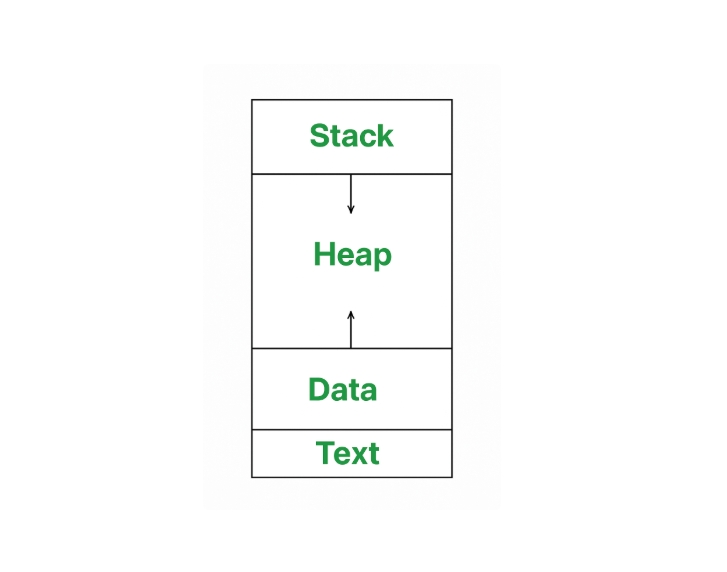
Components of a Process
| Component | Description |
|---|---|
| Program Code | Instructions to execute |
| Program Counter (PC) | Address of next instruction to execute |
| CPU Registers | Current values of CPU registers |
| Stack | Function calls and local variables |
| Heap | Dynamically allocated memory |
| Data Section | Global and static variables |
Process Architecture in Memory
How an OS Creates a Process
| Step | Action |
|---|---|
| 1 | Load program code & static data into memory |
| 2 | Allocate runtime stack (for function calls, local variables) |
| 3 | Allocate heap memory (for dynamic data) |
| 4 | Set up I/O tasks (e.g., standard input/output) |
| 5 | Hand over control to program's main() function |
Process Control Block (PCB)
PCB is a data structure maintained by the OS that stores all information about a process.
PCB Contains:
| Field | Purpose |
|---|---|
| Process ID (PID) | Unique identifier |
| Process State | New, Ready, Running, Waiting, Terminated |
| Program Counter (PC) | Address of next instruction |
| CPU Registers | Saved during context switch |
| Memory Information | Memory allocated to process |
| Scheduling Information | Priority, etc. |
| I/O Information | Open files, devices |
Process States
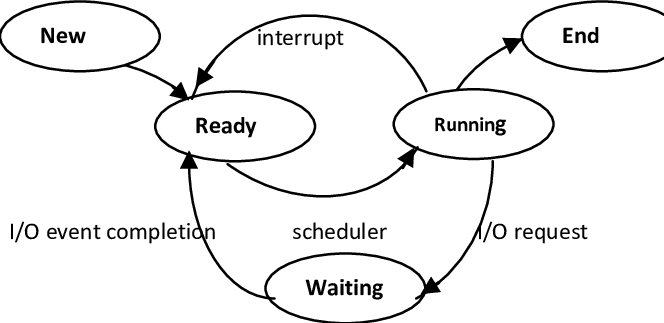
| State | Description |
|---|---|
| New | Process being created (in secondary memory) |
| Ready | Loaded into RAM, waiting for CPU |
| Running | Currently executing on CPU |
| Waiting | Waiting for I/O or event |
| Terminated | Finished execution |
Schedulers
| Scheduler | Function |
|---|---|
| Long-Term Scheduler | Picks processes from secondary memory and loads them into RAM |
| Short-Term Scheduler | Picks processes from ready queue and dispatches to CPU |
| Medium-Term Scheduler | Handles swapping (removes/restores processes from memory) |
Process Scheduling Metrics
| Metric | Formula | Description |
|---|---|---|
| Arrival Time | - | Time process arrives in ready queue |
| Completion Time | - | Time process completes execution |
| Burst Time | - | Time required for CPU execution |
| Turnaround Time | Completion - Arrival | Total time in system |
| Waiting Time | Turnaround - Burst | Time spent waiting in ready queue |
🧵 7. THREADS
What is a Thread?
A thread is the smallest unit of CPU execution inside a process. It is lightweight because it shares resources with other threads of the same process.
Why is a Thread Called a Lightweight Process?
- Because it shares the process's memory and resources instead of creating its own copy.
Thread Resources
| Shared Among Threads | Private to Each Thread |
|---|---|
| Code section | Program Counter (PC) |
| Data section | Registers |
| Heap memory | Stack |
| Open files |
User Threads vs Kernel Threads
| User Threads | Kernel Threads |
|---|---|
| Managed by user library | Managed by OS |
| Faster | Slower |
| No kernel involvement | Kernel involvement required |
| Less overhead | More overhead |
| One blocked thread may block entire process | Other threads continue running |
Multitasking vs Multithreading
| Multitasking | Multithreading |
|---|---|
| Execution of multiple tasks (processes) simultaneously | Execution of multiple threads within the same process |
| Involves multiple processes | Involves multiple threads of a single process |
| Process Context Switching | Thread Context Switching |
| Each process has its own memory and resources | Threads share the same memory and resources |
| Provides isolation and memory protection | No memory isolation between threads |
| Requires more memory | Requires less memory |
| Slower context switching | Faster context switching |
| Higher overhead | Lower overhead |
| Example: Running Chrome, Spotify, VS Code | Example: Chrome - one thread loads webpage, another downloads files |
Thread Scheduling
- Threads scheduled by Operating System (OS)
- Based on thread priority
- Every thread gets a CPU time slice
Thread Context Switching vs Process Context Switching
| Thread Context Switching | Process Context Switching |
|---|---|
| Switches between threads of same process | Switches between different processes |
| Memory address space NOT switched | Memory address space IS switched |
| Only PC, Registers, Stack switched | PC, Registers, Stack AND memory space switched |
| Fast context switching | Slow context switching |
| Lower overhead | Higher overhead |
| CPU cache preserved | CPU cache flushed |
Important Points
Context switching is the process of saving the state of the currently running process/thread and loading the state of another process/thread so that the CPU can switch execution between them.
Overhead is the extra CPU time and system resources spent on management tasks instead of executing the actual program.
Problem: CPU spends time saving and restoring process states instead of executing the actual program → increases overhead → reduces CPU efficiency.
fork() System Call
fork()creates a child process- Total processes = 2ⁿ - 1 if
fork()is called n times
📋 8. SCHEDULING ALGORITHMS
Key Concepts
Convoy Effect: Occurs when a long process gets CPU first, causing shorter processes to wait.
Starvation: Process waits indefinitely because others keep getting CPU first.
Preemptive vs Non-Preemptive Scheduling
| Preemptive Scheduling | Non-Preemptive Scheduling |
|---|---|
| OS can interrupt running process | Once process gets CPU, it holds until finished |
| Examples: Round Robin, SRTF, Preemptive Priority | Examples: FCFS, SJF, HRRN, Non-Preemptive Priority |
Scheduling Algorithms Comparison
| Algorithm | Description | Pros | Cons |
|---|---|---|---|
| FCFS | Schedules by arrival time | Simple, easy to implement | High waiting time, Convoy Effect |
| SJF (Non-Preemptive) | Shortest burst time first | Minimum average waiting time, Efficient | Burst time must be known, Starvation of long processes |
| SRTF (Preemptive SJF) | Preemptive version of SJF | Lower waiting time, Better response time | Frequent context switching, Starvation possible |
| Round Robin | Fixed Time Quantum (Time Slice) | Fair, Good response time | Too many context switches if quantum is small |
| Priority Scheduling | Highest priority executes first | Important processes execute first | Starvation of low-priority processes → Solution: Aging |
| HRRN | Highest Response Ratio Next | Prevents starvation, Better than SJF | More calculations |
HRRN Formula
Response Ratio = (Waiting Time + Burst Time) / Burst Time
Multilevel Queue (MLQ)
- Processes divided into different queues based on priority/type
- Fixed queues - process cannot move between queues
text
System Queue (Highest Priority) ↓ Interactive Queue ↓ Background Queue (Lowest Priority)
Issue: Lower queues may starve.
Multilevel Feedback Queue (MLFQ)
- Processes can move between queues depending on CPU usage
text
High Priority (Interactive jobs stay here) ↓ Medium Priority ↓ Low Priority (CPU-intensive jobs move here)
Features:
- Process can move up or down
- Interactive jobs stay in higher-priority queues
- CPU-intensive jobs move to lower-priority queues
- Better CPU utilization
- Reduces starvation
🔒 9. SYNCHRONIZATION
Critical Section Problem
The Critical Section Problem ensures that when multiple processes/threads share data, only one can access shared data at a time.
| Term | Definition |
|---|---|
| Critical Section | Part of program where shared resources are accessed/modified |
| Remainder Section | Part of program that does not access shared resources |
Race Condition
A race condition occurs when two or more processes/threads access and modify shared data simultaneously, causing the final result to depend on the order of execution.
Solutions to Critical Section Problem
- Mutex (Mutual Exclusion)
- Semaphore
- Monitor
- Lock
Conditions for Solving Critical Section Problem
| Condition | Description |
|---|---|
| Mutual Exclusion | Only one process can execute in critical section at a time |
| Progress | If critical section is free, waiting process should enter without unnecessary delay |
| Bounded Waiting | Every process must get a chance after a limited waiting time (prevents starvation) |
Synchronization Tools
Synchronization tools prevent race conditions and ensure safe access to shared resources.
Semaphore
A semaphore is a synchronization mechanism used to control access to shared resources.
| Type | Values | Use Case |
|---|---|---|
| Binary Semaphore | 0 or 1 (1 = available, 0 = busy) | Mutual Exclusion |
| Counting Semaphore | Values > 1 | Multiple instances of a resource |
we have wait() Decrements counter. If counter < 0, blocks
signal() - Increments counter. Wakes up a blocked thread
Mutex
A Mutex (Mutual Exclusion) is a locking mechanism that allows only one thread/process to access a shared resource at a time.
| Binary Semaphore | Mutex |
|---|---|
| Value = 0 or 1 | Lock or Unlock |
| Any thread/process can signal (release) | Only thread that locked it can unlock it |
| Used for synchronization | Used for mutual exclusion |
PETERSON'S SOLUTION
Problem: Mutual exclusion for two processes sharing a critical section (no hardware support, no OS help)
Goal: Ensure only one process enters the critical section at a time
Algorithm
// Shared variables (initialized to 0)
int flag[2] = {0, 0};    // flag[i] = 1 means process i wants to enter
int turn = 0;            // Whose turn is it?

// Process 0
flag[0] = 1;             // "I want to enter"
turn = 1;                // "But I give priority to the other process"
while (flag[1] && turn == 1) { } // Wait if other wants and it's their turn
// ----- CRITICAL SECTION -----
flag[0] = 0;             // "I'm done"

// Process 1
flag[1] = 1;             // "I want to enter"
turn = 0;                // "But I give priority to the other process"
while (flag[0] && turn == 0) { } // Wait if other wants and it's their turn
// ----- CRITICAL SECTION -----
flag[1] = 0;             // "I'm done"
Problems
- Busy Waiting (Spinlock) - Wastes CPU cycles
- Only Works for 2 Processes
Conditional Variable
A condition variable is a synchronization primitive that allows threads to sleep (block) until a specific condition becomes true.
- Works with a lock
- Thread can wait only when it has acquired a lock
- When thread enters wait state, it releases the lock
- Another thread notifies when event occurs
The Producer-Consumer problem involves two threads sharing a fixed-size buffer. The Producer adds data, and the Consumer removes it. We must ensure the Producer doesn't add to a full buffer, the Consumer doesn't remove from an empty buffer, and neither thread wastes CPU cycles spinning in a loop.
The Producer-Consumer problem is solved using a mutex and two condition variables -
not_fullfor producers andnot_emptyfor consumers.The Producer locks the mutex, checks if the buffer is full using a
whileloop. If full, it callswait()onnot_full- which atomically unlocks the mutex and puts the Producer to sleep. When woken up, it adds the item, signalsnot_emptyto wake a sleeping Consumer, and unlocks the mutex.The Consumer does the opposite - locks the mutex, checks if buffer is empty using a
whileloop. If empty, it callswait()onnot_emptyand sleeps. When woken up, it removes the item, signalsnot_fullto wake a sleeping Producer, and unlocks the mutex.We use
whileinstead ofifto handle spurious wakeups and race conditions, ensuring the thread re-checks the condition before proceeding.
🔄 10. DEADLOCK
What is Deadlock?
A Deadlock is a situation where two or more processes are permanently blocked because each process is holding a resource and waiting for another resource held by another process.
Necessary Conditions for Deadlock (4 Conditions)
| Condition | Description |
|---|---|
| M - Mutual Exclusion | Resources are non-shareable |
| H - Hold and Wait | Process holds resources while waiting for others |
| N - No Preemption | Resource cannot be forcibly taken, released only by process itself |
| C - Circular Wait | Circular chain of processes waiting for each other's resources |
M + H + N + C = Deadlock
How to Prevent Deadlock?
Break any one condition:
- Make resources shareable (remove Mutual Exclusion where possible)
- Don't allow Hold and Wait (request all resources at once)
- Allow resource preemption
- Prevent Circular Wait (enforce ordering of resource requests)
Methods for Handling Deadlocks
| Method | Description | Pros | Cons |
|---|---|---|---|
| 1. Prevention/Avoidance | Ensure at least one condition is not satisfied | Deadlocks never occur | Lower resource utilization, Complex |
| 2. Detection & Recovery | Allow deadlocks, detect and recover | Better resource utilization | Recovery is expensive, Some processes lose work |
| 3. Ignore (Ostrich Algorithm) | Ignore deadlocks, restart on failure | No overhead | Data loss, system crashes |
Deadlock Avoidance - Banker's Algorithm
Banker's Algorithm is a deadlock avoidance algorithm that allocates resources only if doing so keeps the system in a safe state.
Goal:
- Avoid deadlock
- Keep system in a Safe State
🍽️ 11. DINING PHILOSOPHERS PROBLEM
Problem Statement
- 5 philosophers sit around a circular table
- Each has a fork on both sides (5 forks total)
- They alternate between Thinking and Eating
- To eat, philosopher needs both adjacent forks (left + right)
- They can pick one fork at a time
The Challenge
- ✅ No two neighbors eat simultaneously
- ✅ No deadlock
- ✅ No starvation
Deadlock Scenario
text
All 5 philosophers get hungry at the same time:
- Each picks up their LEFT fork simultaneously
- All forks are taken (semaphore count = 0)
- Each tries to pick up their RIGHT fork
- ❌ DEADLOCK! Everyone waits forever
Solutions
| Solution | Description | Pros |
|---|---|---|
| Limit Seats | Allow at most 4 philosophers at table | Simple, easy to implement |
| Atomic Pickup | Pick up both forks at once in critical section | Fair, no deadlock |
| Odd-Even Rule | Odd: Left first then Right; Even: Right first then Left | No extra resources needed |
Odd-Even Rule:
- Philosophers 1,3,5 (Odd): Pick LEFT first, then RIGHT
- Philosophers 2,4 (Even): Pick RIGHT first, then LEFT
- Breaks circular wait condition → Deadlock impossible
Key Insight: Semaphores alone don't prevent deadlock; we need higher-level policies.
🔄 12. SWAPPING
Swapping
- Done by: Medium-Term Scheduler (MTS)
- What: Move process out of memory (swap-out) → disk → bring back later (swap-in)
- Why: Reduce multi-programming, free memory, improve process mix
- Key: Process resumes from where it left off
👶 13. ORPHAN AND ZOMBIE PROCESSES
Orphan Process
| Aspect | Description |
|---|---|
| Definition | Child process whose parent has terminated |
| What happens | Adopted by init (first OS process) |
| Status | Continues running normally |
Zombie Process (Defunct)
| Aspect | Description |
|---|---|
| Definition | Process finished execution but still has entry in process table |
| Why | Parent hasn't read exit status via wait() |
| Removal | Removed only after parent calls wait() → reaping |
| Common in | Child processes terminated before parent reads their status |
14. Memory Management
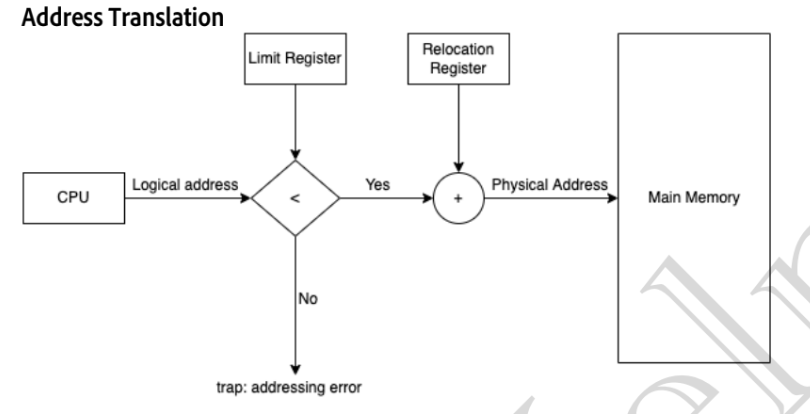
Logical address is the address generated by the CPU and used by the program during execution. It is a virtual address. The Memory Management Unit (MMU) translates this logical address into a physical address, which is the actual location in RAM where the data is stored.
- Logical = What the program thinks
- Physical = Where the data actually is in RAM
Without this mechanism:
- Process A could modify Process B's memory or Overwrite the os. No isolation in memory With base + limit + MMU, each process sees its own virtual memory starting at 0, while the OS ensures it can only access its allocated region in RAM.
Contiguous Memory Allocation: Each process is stored in one continuous (adjacent) block of memory.
Non-Contiguous Memory Allocation: A process is divided into multiple parts and stored at different locations in memory.
Fixed Partitioning: Memory is divided into fixed-size partitions before execution, and each process is loaded into one partition.A process cannot be larger than the largest partition.
Dynamic Partitioning: Partitions are created at runtime according to the process size.
Internal Fragmentation: Unused space inside an allocated partition because the partition is larger than the process. Example:
Partition = 4 MB
Process = 3 MB
Waste = 1 MB (Internal Fragmentation)
External Fragmentation: Free memory is scattered into small non-contiguous blocks, so a large process cannot be allocated even if the total free memory is sufficient. Example:
Free = 5 MB + 3 MB
Need = 8 MB
Cannot allocate (not contiguous)
Degree of Multiprogramming - The number of processes that can reside in memory at the same time.
15. Free Space Management
Defragmentation (Compaction) : The process of combining scattered free memory into one large contiguous block by moving processes together to eliminate external fragmentation.
Free Space Management : A linked list that stores all free memory blocks (holes) in memory.
Hole : A free (unused) block of memory available for allocating a process.
First Fit : Allocates the first free memory block that is large enough for the process.
Next Fit : Similar to First Fit, but starts searching from the last allocated position instead of the beginning.
Best Fit : Allocates the smallest free block that is large enough for the process
Worst Fit: Allocates the largest available free block to the process.
16. Paging | Non-Contiguous memory allocation
-
To remove external fragmentation we introduces the idea of paging where we do non contiguous memory allocation.
-
Process is divided into Pages.
-
RAM is divided into Frames.
-
Page size = Frame size.
Page Table: A data structure maintained by the OS that maps Page Number → Frame Number.
In paging, the CPU never generates a page number directly.
It generates a Logical Address.
The logical address is split into two parts:
Logical Address

+----------------------+------------------+
|   Page Number (P)    |    Offset (d)    |
+----------------------+------------------+
- Page Number (P): Which page?
- Offset (d): Which byte inside that page?
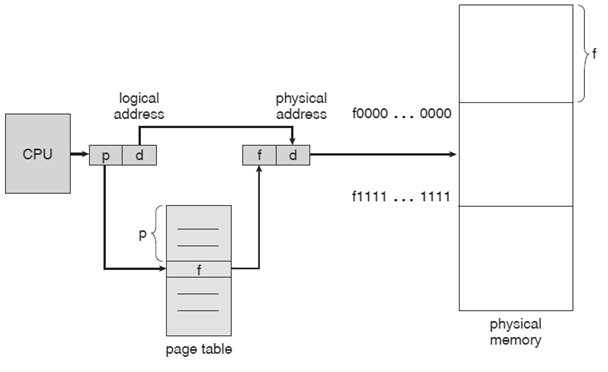
The page table replaces the Page Number with the Frame Number, while the Offset remains unchanged.
Page table is stored in the PCB which is unique for each process. why ? because the virtual address space is unique for each process.
Why is Paging Slow?
CPU
 ↓
Page Table (Memory Access 1)
 ↓
RAM (Memory Access 2)
➡️ 2 memory accesses are needed for every data access.
Solution : TLB is a small, high-speed hardware cache that stores recently used Page Number → Frame Number mappings to speed up address translation.
- TLB Hit: Mapping found in TLB → Faster access.
- TLB Miss: Mapping not found in TLB → Check page table, update TLB, then access memory.
ASID: Unique process ID stored in TLB entries to distinguish mappings of different processes.
17. Segmentation | Non-Contiguous Memory Allocation
Segmentation is a non-contiguous memory allocation technique in which a process is divided into variable-sized logical segments based on the programmer's (user's) view of the program.
Memory Trick: Segmentation = Divide by Function
Why Segmentation? Paging divides memory into fixed-size pages, but it ignores the logical structure of the program. Segmentation divides the program according to its logical parts.
Like paging has a Page Table, Segmentation has a Segment Table.
It stores:
| Segment Number | Base Address | Limit |
|---|---|---|
| 0 | 5000 | 1000 |
| 1 | 12000 | 3000 |
| 2 | 25000 | 2000 |
- Base → Starting physical address of the segment.
- Limit → Size of the segment.
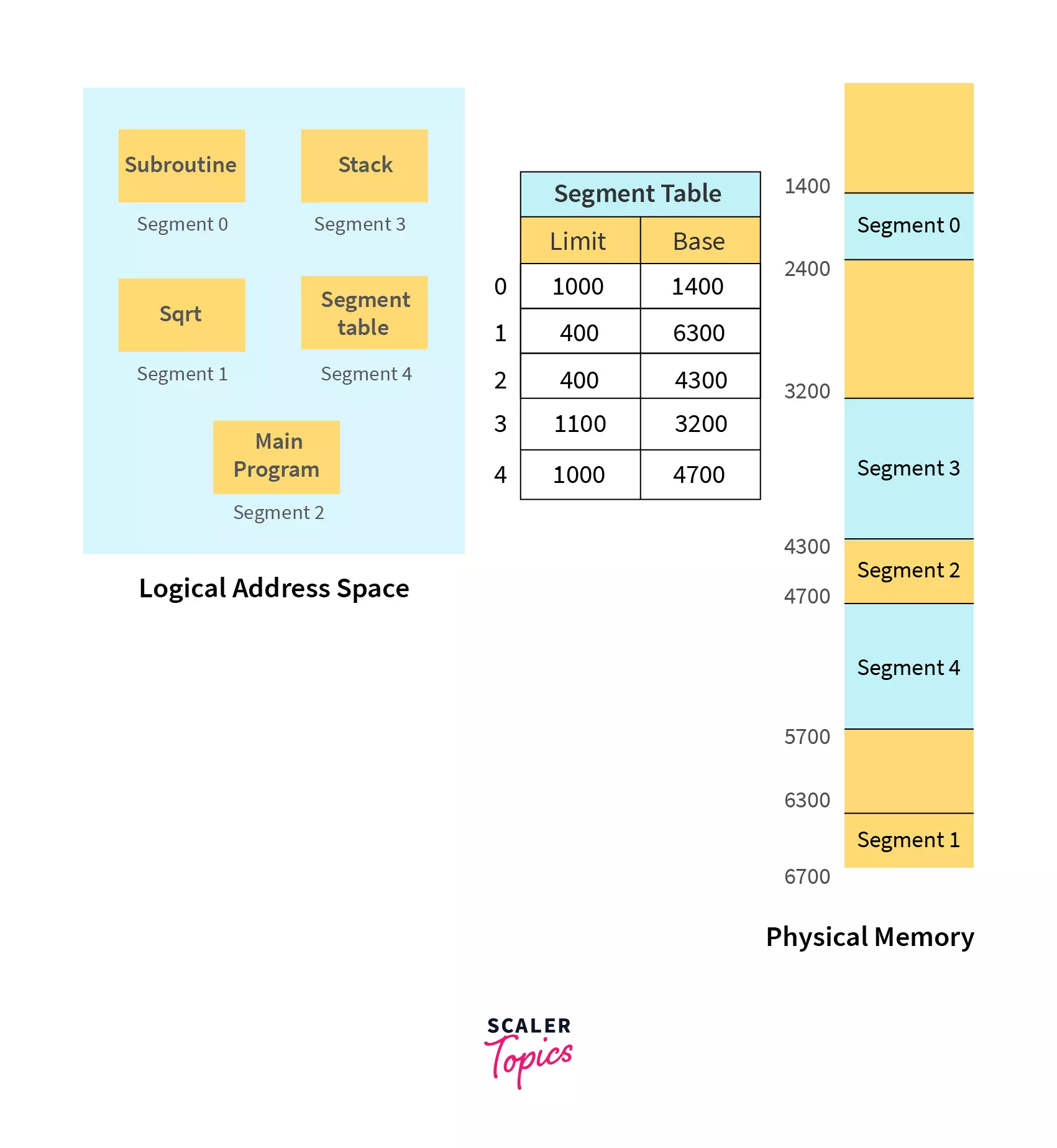
Modern System architecture provides both segmentation and paging implemented in some hybrid approach.
- ✅ No Internal Fragmentation
- ✅ Divides program according to logical functions
- ✅ Better memory protection and sharing
- ✅ Segment table is usually smaller than the page table
- ❌ External Fragmentation
- ❌ Variable-sized segments make memory allocation and swapping harder
18. What is Virtual Memory? || Demand Paging || Page Faults
Virtual Memory is a memory management technique that allows a process to execute even if the entire process is not loaded into RAM. The remaining pages are stored on disk (swap space) and loaded only when needed.
Suppose
- RAM = 4 GB
- Program = 10 GB
Without Virtual Memory: ❌ Program cannot run.
- Only the required pages stay in RAM.
- Remaining pages stay on disk.
Swap Space : Swap Space is a portion of secondary storage (disk/SSD) used to temporarily store pages that are not currently in RAM.
Demand Paging : Demand Paging is a virtual memory technique in which a page is loaded into RAM only when it is needed.
Pager : Pager is the OS component that transfers individual pages between disk and RAM.
Valid-Invalid Bit : Valid Bit = 1 ✔ Page is present in RAM. Invalid Bit = 0 ❌ Page is not in RAM
A Page Fault occurs when a process tries to access a page that is not currently present in RAM.
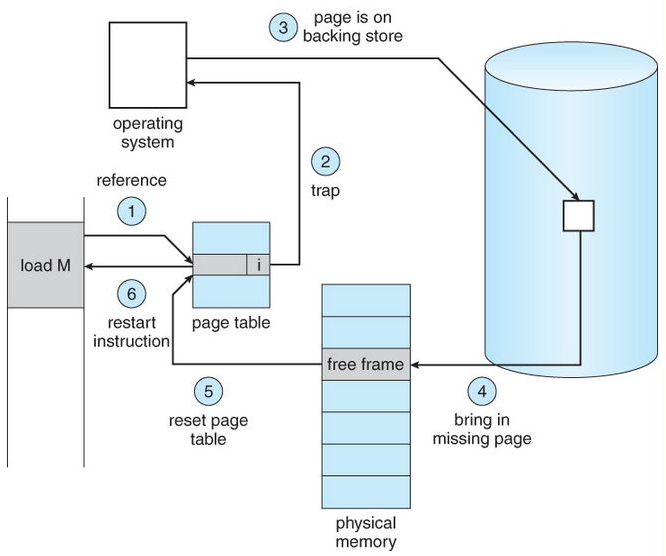
When the CPU accesses a page, the MMU checks the page table. If the page is present in RAM (valid bit = 1), execution continues. If not (valid bit = 0), a page fault occurs. The OS checks whether the page is valid. If it is valid, it loads the page from disk into a free frame, updates the page table, and restarts the interrupted instruction. If the page is invalid, the OS terminates the process.
19. Page Replacement Algorithms
When a page fault occurs and there is no free frame in RAM, the OS must remove an existing page and load the required page. This process is called Page Replacement.
Aim: Minimize Page Faults
FIFO : Replace the page that entered memory first (oldest page).
Optimal Page Replacement : Replace the page that will not be used for the longest time in the future. Lowest possible page faults. Impossible to implement because the OS cannot predict the future.
LRU : Replace the page that has not been used for the longest time in the past.
- Stack (most recent at top, least recent at bottom) Example:
Recently Used:

A → just now
B → 2 sec ago
C → 20 sec ago

Replace C
LFU : Replace the page with the lowest reference count. Example:
A → 10 accesses
B → 2 accesses
C → 7 accesses

Replace B
- Optimal is best theoretical and LRU is best practical algorithm.
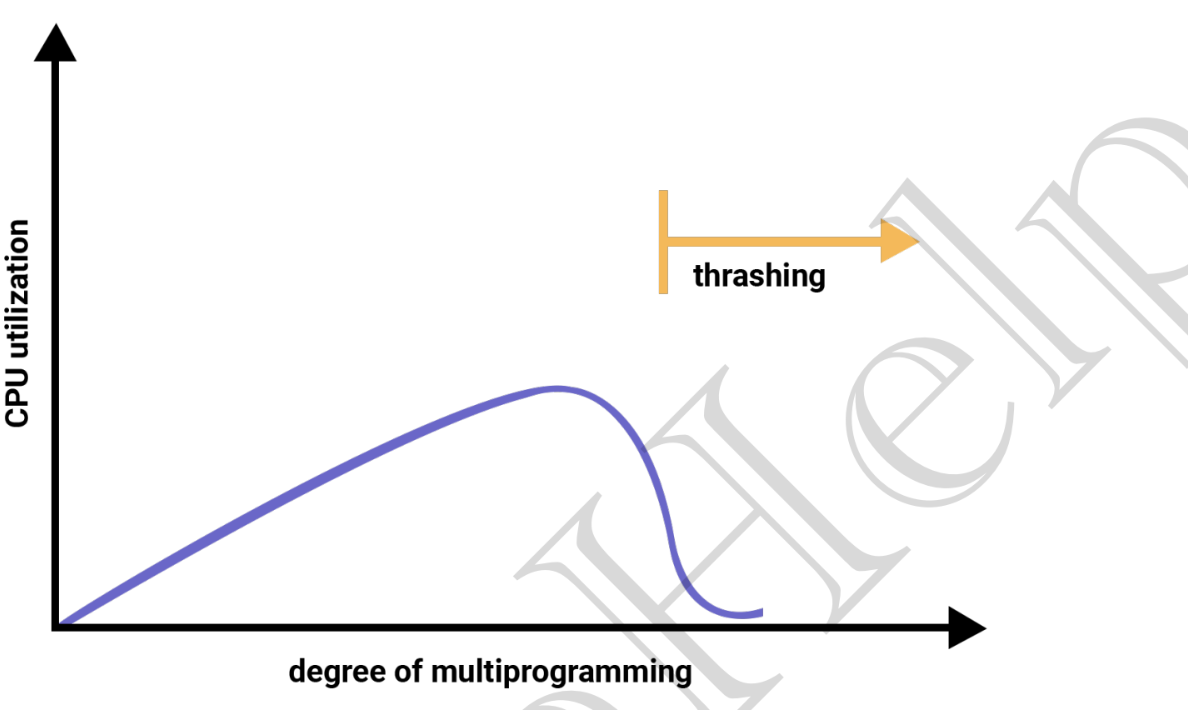
20. Thrashing
Thrashing is a condition in which the system spends more time handling page faults (swapping pages) than executing the actual program.
Too many page faults = Thrashing
When a process has too few frames in RAM:
- A needed page is missing → Page Fault
- OS loads that page.
- To load it, another page is removed.
- The removed page is needed again.
- Another page fault occurs.
This cycle repeats continuously.
❌ CPU waits for disk most of the time.
Solution :
- Allocate enough frames to a process so that all its currently active pages (working set) fit in memory.
- Control the page fault rate by increasing or decreasing the number of frames allocated to a process.