Database: A database is a collection of related data which represents some aspect of the real world. A database system is designed to be built and populated with data for a certain task
Database Management System (DBMS) is a software for storing and retrieving users' data while considering appropriate security measures. It consists of a group of programs which manipulate the database. The DBMS accepts the request for data from an application and instructs the operating system to provide the specific data. In large systems, a DBMS helps users and other third-party software to store and retrieve data.
Database management systems were developed to handle the following difficulties of typical File-processing systems supported by conventional operating systems.
- Data redundancy and inconsistency
- Difficulty in accessing data
- Data isolation – multiple files and formats
- Integrity problems
- Atomicity of updates
- Concurrent access by multiple users
- Security problems
1. Data redundancy and inconsistency
Same data duplicated in multiple files. Updates in one place don't sync everywhere → inconsistent values (e.g., same customer has different addresses in billing vs. shipping files).
2. Difficulty in accessing data
No flexible query language. To get new reports, you must write a new program in a low-level language (e.g., COBOL) – cannot just ask "get all customers above 30".
3. Data isolation – multiple files and formats
Data scattered across different files with different structures (.txt, .dat). Combining them requires complex, custom code.
4. Integrity problems
No automatic rules to enforce valid data (e.g., age > 0, salary range). Must be coded manually in every program – easy to forget.
5. Atomicity of updates
If system crashes during a multi-step update (e.g., transferring ₹1000: debit account A, credit account B), only one step completes → money disappears or is created. No "all-or-nothing" guarantee.
6. Concurrent access by multiple users
No built-in locking. Two users reading and writing same file simultaneously causes lost updates or inconsistent reads (e.g., both book last train seat → oversold).
7. Security problems
Access control is coarse (file-level only). Cannot restrict at row/column level. Easy for unauthorized users to copy or modify sensitive data.
ER diagram:
ER diagram or Entity Relationship diagram is a conceptual model that gives the graphical representation of the logical structure of the database.
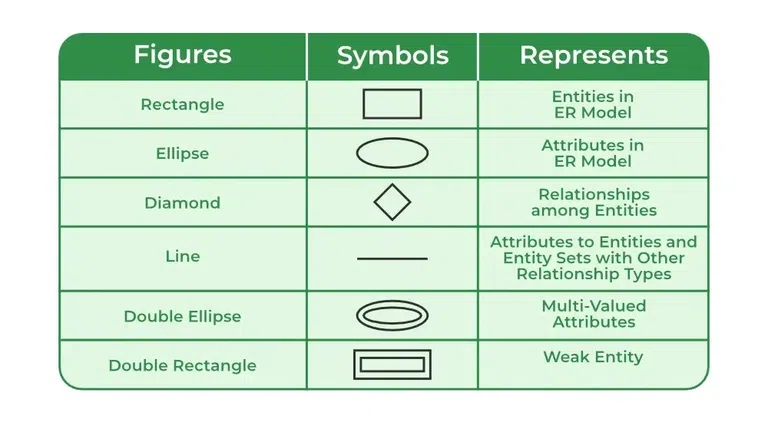
1. Entity
Real-world object (noun) – e.g., Student, Car, Order.
→ Strong: exists independently.
→ Weak: depends on another entity (needs foreign key).
2. Attribute
Property of an entity – e.g., Name, Age, Price.
Types:
- Simple (atomic) – e.g., Age
- Composite – e.g., Full Name (First + Last)
- Derived – e.g., Age (from DOB)
- Multivalued – e.g., Phone Numbers (multiple)
3. Key Attribute
Uniquely identifies an entity – e.g., Student ID. (Underlined in diagram).
4. Relationship
Association between two or more entities – e.g., Enrolls (Student ↔ Course).
→ Shown as a diamond.
5. Degree of Relationship
Number of entities involved:
- Unary (1 entity) – e.g., Manager manages Employee
- Binary (2) – most common
- Ternary (3+) – rare
6. Cardinality Constraints (Mapping)
How many entities participate:
- 1:1 (one-to-one)
- 1:N (one-to-many)
- M:N (many-to-many)
7. Participation
- Total (double line) – every entity must participate (e.g., every Student must Enroll).
- Partial (single line) – optional participation.
8. Notations (simplest):
- Rectangles = Entities
- Ellipses = Attributes
- Diamonds = Relationships
- Underlined = Primary Key
Examples :
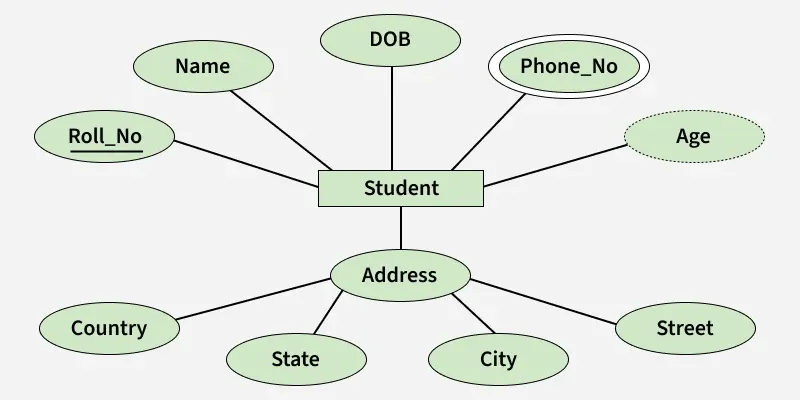
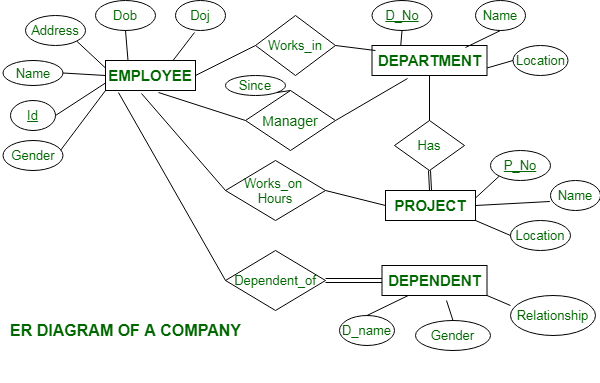
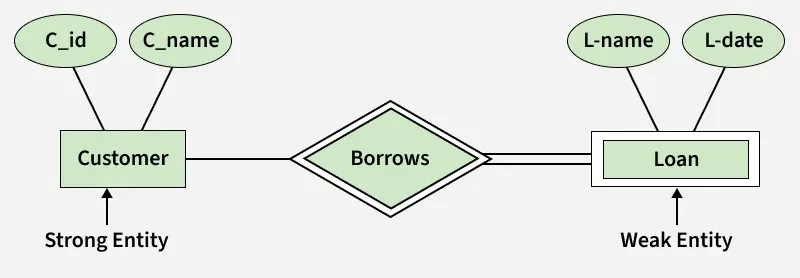
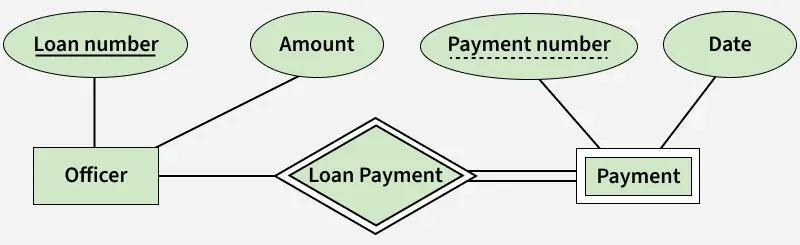
Payment is Weak Entity bcz it depends on the Officer. Payment number is Discriminator( partial key). Discriminator can identify a group of entities from the entity set.
- Strong entity:
Course(PK:Course_ID) - Weak entity:
Section(depends on Course) - Discriminator:
Sec_No(1, 2, 3...) →Sectionis uniquely identified by (Course_ID+Sec_No)
→Sec_Noalone is not unique across all courses, but it is unique within one course.
Relationship = Association among entities.
Degrees (by number of participating entity sets):
| Type | Entities Involved | Example |
|---|---|---|
| Unary (Recursive) | 1 | Employee manages Employee (boss-subordinate) |
| Binary | 2 | Student enrolls in Course (most common) |
| Ternary | 3 | Doctor prescribes Medicine to Patient |
| N-ary | N (any number) | Supplier supplies Parts to Project (4 entities) |
| Type | A → B | B → A | Example |
|---|---|---|---|
| 1:1 | At most 1 | At most 1 | Person ↔ Passport |
| 1:N (One-to-Many) | Any number (0+) | At most 1 | Department → Employee (one dept has many employees) |
| N:1 (Many-to-One) | At most 1 | Any number (0+) | Employee → Department (many employees belong to one dept) – same as 1:N reversed |
| M:N (Many-to-Many) | Any number (0+) | Any number (0+) | Student ↔ Course |
Attributes :
| Type | Definition | Example | ER Notation |
|---|---|---|---|
| Simple | Cannot be divided further | Age, Salary | Ellipse |
| Composite | Made of smaller simple attributes | Name (First + Middle + Last), Address (Street + City + Zip) | Ellipse with child ellipses attached |
| Multivalued | Can have multiple values for one entity | Mobile No (home, work), Email ID | Double ellipse |
| Derived | Derived from other attributes | Age (from DOB), Experience (from Joining Date) | Dashed ellipse |
| Key | Uniquely identifies an entity | Roll No, Student ID, PAN | Underlined text in ellipse |
| Relational constraints : |
| Constraint | What it ensures | Example |
|---|---|---|
| Domain | Attribute values must be from a defined set (atomic) | Age must be integer between 0–150; Gender must be 'M'/'F' |
| Tuple Uniqueness | No two rows (tuples) are identical in a relation | Two students cannot have all same values in every column |
| Key | Primary key values must be unique and not null | Roll_No must be unique for every student |
| Entity Integrity | No part of the primary key can be NULL | If PK is (Student_ID, Course_ID), neither can be NULL |
| Referential Integrity | When a table has a Foreign Key (FK), that FK must point to a valid, existing Primary Key (PK) in another table. | Student.Dept_ID must exist in Department.Dept_ID or be NULL |
| Key | Definition | Key Points | Example |
|---|---|---|---|
| Super Key | Any set of attributes that uniquely identifies a tuple | Can have extra/unnecessary attributes | {Roll_No}, {Roll_No, Name}, {Roll_No, Age} – all are super keys |
| Candidate Key | Minimal super key (no extra attributes) | A super key reduced to the minimum needed | {Roll_No} or {Aadhar} – minimal and unique |
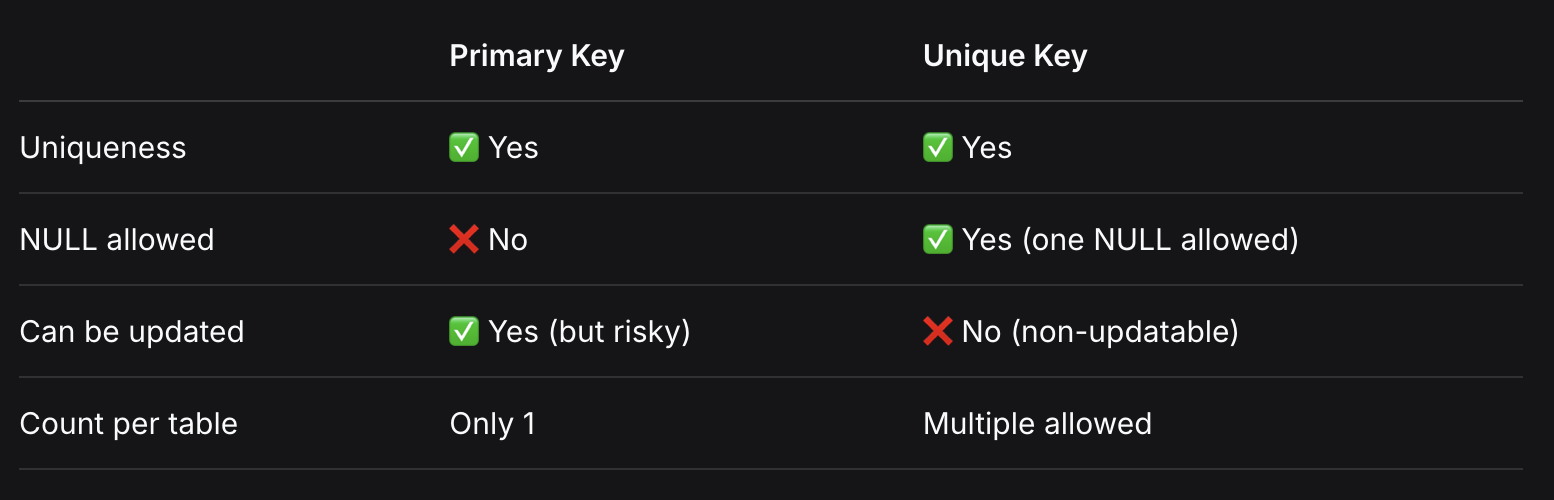
| Primary Key | One candidate key chosen by the designer | Unique + NOT NULL; only one per table | Roll_No selected as PK |
| Alternate Key | Candidate keys not chosen as primary key | Also called secondary keys | If Roll_No is PK, then Aadhar is alternate key |
| Foreign Key | Attribute that references PK of another table | Values must exist in parent table or be NULL | Employee.Dept_ID references Department.Dept_ID |
| Composite Key | Primary key made of two or more attributes | Use when single attribute cannot uniquely identify | {Student_ID, Course_ID} together as PK |
| Unique Key | Uniquely identifies each record | Unique but can be NULL; non-updatable | PAN_Number, Email – can be NULL for some rows |
Functional Dependencies
Imagine one single table: STUDENT_COURSE (used by a university).
| Roll_No | Student_Name | Dept | Dept_HOD | Course | Credits | Grade |
|---|---|---|---|---|---|---|
| 101 | Alice | CS | Dr. Smith | DBMS | 4 | A |
| 102 | Bob | CS | Dr. Smith | Python | 4 | B |
| 103 | Charlie | EC | Dr. Jones | DBMS | 4 | A |
1. What is a Functional Dependency (FD)?
It is a logical business rule.
- Rule: If two rows have the same value on the Left Side (X), they must have the same value on the Right Side (Y).
- Example FD:
Roll_No → Student_Name - Why? Look at the table. If I give you Roll_No
101, it always givesAlice. It is impossible for Roll_No 101 to be "Alice" in one row and "Bob" in another.
2. Trivial vs Non-Trivial FD
- Trivial (Always true, useless):
{Roll_No, Student_Name} → {Roll_No} - Why? The Right side (Roll_No) is just a part of the Left side. It is obvious. You don't need a rule for this.
- Non-Trivial (Important business rule):
{Roll_No} → {Student_Name} - Why? The Right side (Student_Name) is not a part of the Left side (Roll_No). This is a real rule that must be enforced.
3. Closure of Attributes (How to find the KEY)
Closure means: "Starting with X, what is the FULL set of all columns I can reach?"
- Question: Find the Closure of
Roll_No. (Written asRoll_No⁺). - Step 1: Start with itself.
{Roll_No}. - Step 2: Look at rules.
Roll_No → Student_Name. Add it. Now we have{Roll_No, Student_Name}. - Step 3: Look at more rules.
Roll_No → Dept. Add it. Now we have{Roll_No, Student_Name, Dept}. - Step 4:
Dept → Dept_HOD. Add it. Now we have{Roll_No, Student_Name, Dept, Dept_HOD}. - Result:
Roll_No⁺={Roll_No, Student_Name, Dept, Dept_HOD}. (Note: It cannot find Course or Grade because one student takes many courses).
4. Finding Candidate Key using Closure
A Candidate Key is the smallest set of columns whose Closure gives ALL columns of the table.
-
Try
Roll_No:Roll_No⁺gave{Roll_No, Name, Dept, HOD}. It missedCourse,Credits, andGrade. SoRoll_Noalone is NOT a key. -
Try
Course:Course⁺gives{Course, Credits}(because Course → Credits). It misses everything else. Not a key. -
Try
{Roll_No, Course}:Roll_Nogives Name, Dept, HOD.Coursegives Credits.- Together, they give ALL columns:
{Roll_No, Name, Dept, HOD, Course, Credits, Grade}.
-
Result:
{Roll_No, Course}is the Candidate Key (the unique identifier for this table).
5. Armstrong's Axioms (Math Rules for FDs)
If I tell you Rule 1: X → Y and Rule 2: Y → Z, you can mathematically guess Rule 3: X → Z without even looking at the table.
- Reflexivity (Obvious): If I know
{Roll_No, Course}, I obviously know{Roll_No}.{A,B} → {A}. - Augmentation (Adding): If
Roll_No → Name, then addingCourseto both sides still holds:{Roll_No, Course} → {Name, Course}. - Transitivity (Chain): If
Roll_No → DeptandDept → HOD, then directly:Roll_No → HOD. (You don't need Dept in between).
6. Full vs Partial Dependency (Crucial for Normalization)
-
Full FD: The Left side must have ALL the columns to find the Right side.
- Example:
{Roll_No, Course} → Grade. (You need BOTH student AND course to know their grade. One alone doesn't work). This is Full.
- Example:
-
Partial FD: A subset of the left side is enough to find the Right side.
-
Example:
{Roll_No, Course} → Student_Name. -
Why? Because a subset (
Roll_No) alone is enough to find the name. You don't need the Course. This is Partial.
-
7. Transitive Dependency (Chain reaction)
When one non-key column depends on another non-key column (instead of directly on the key).
- We know:
Roll_No → DeptandDept → HOD. - Therefore:
Roll_No → HOD. - Problem:
HODdepends onDept, not directly on the student. If Dr. Smith leaves, updating HOD in 1 place is fine, but in this table you'd have to update it in 1000 places! This is a Transitive Dependency.
Summary Cheat Sheet (Just for revision)
| Topic | Explanation using our example |
|---|---|
| FD Rule | If you know Roll_No, you must know the Name. |
| Trivial | Roll_No, Name → Name (Useless, obvious). |
| Closure | Roll_No⁺ = Roll_No + Name + Dept + HOD. |
| Candidate Key | {Roll_No + Course} because only together they find everything. |
| Partial Dep. | {Roll_No + Course} → Name (Roll_No alone finds Name). BAD. |
| Transitive Dep. | Roll_No → Dept → HOD. BAD. |
Decomposition
1. What is Decomposition?
Splitting one big table into smaller tables to remove redundancy.
2. Two Must-Know Properties
| Property | Meaning | Mandatory? |
|---|---|---|
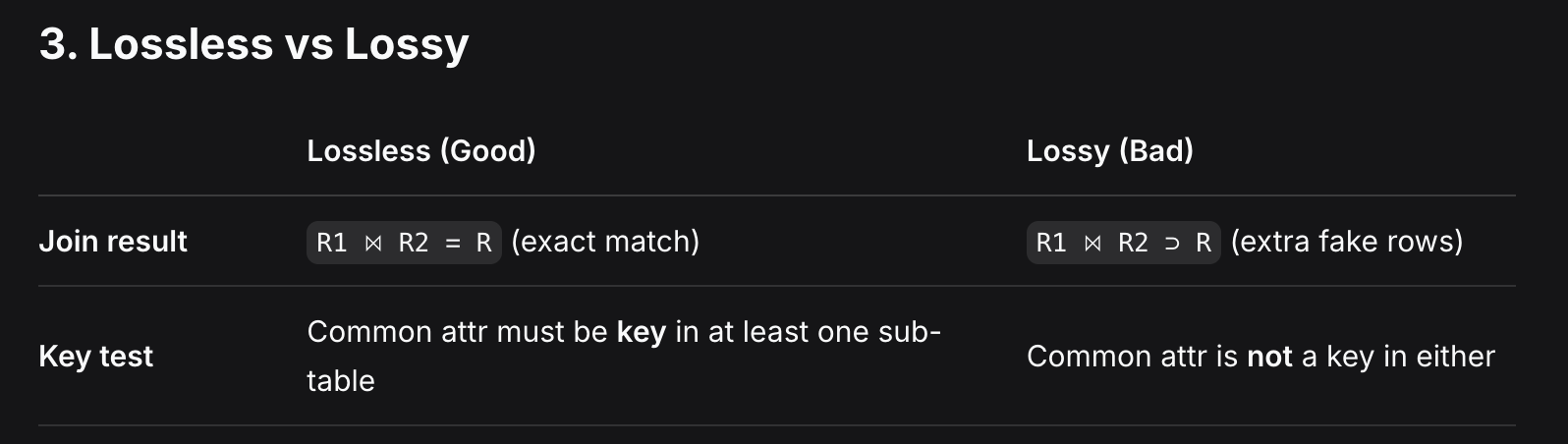
| Lossless Join | Joining sub-tables gives back exact original table (no extra rows) | ✅ Yes |
| Dependency Preservation | All original FDs are still checkable in sub-tables without joining | ❌ No (but desirable) |
3. Lossless vs Lossy
4. Dependency Preservation
- Preserved: All FDs can be checked locally in sub-tables.
- Not Preserved: Need to join tables to check some FDs.
5. Interview Quick Recap
| Question | Answer |
|---|---|
| Which property is mandatory? | Lossless Join |
| What happens in lossy? | Extra rows appear on join |
| Lossless test? | Common column = key in at least one sub-table |
Normalization
The Scenario: A University Course Enrollment Table
Our university has one giant table called STUDENT_COURSE that tracks students, their professors, and their grades.
Original Table R:
| Student_ID | Student_Name | Course_ID | Course_Name | Professor_ID | Professor_Phone | Grade |
|---|---|---|---|---|---|---|
| 101 | Alice | C1 | DBMS | P1 | 1111 | A |
| 101 | Alice | C2 | Python | P2 | 2222 | B |
| 102 | Bob | C1 | DBMS | P1 | 1111 | B |
| 103 | Charlie | C3 | Java | P3 | 3333 | A |
Functional Dependencies (Business Rules):
Student_ID → Student_Name(A student has one name)Course_ID → Course_Name, Professor_ID(A course has one name and one professor)Professor_ID → Professor_Phone(A professor has one phone)Student_ID, Course_ID → Grade(A student gets one grade per course)
🔴 Step 0: The Problems (Why we need Normalization)
- Redundancy: Alice's name is repeated twice. Professor P1's phone is repeated.
- Update Anomaly: If Professor P1 changes phone to 9999, we must update it in 2 rows. If we miss one, data becomes inconsistent.
- Insert Anomaly: We cannot add a new course (
C4) taught byP4until a student enrolls in it. - Delete Anomaly: If Bob drops
C1, we lose the fact thatP1teachesDBMS.
🟢 Step 1: First Normal Form (1NF)
Rule: Every cell must have a single atomic value (no lists, no multiple values).
Our table is already in 1NF because every cell has exactly one value (e.g., Alice has two rows, not one row with two courses in one cell).
Status: ✅ 1NF achieved.
🟡 Step 2: Second Normal Form (2NF)
Rules:
- Must be in 1NF (✅ Yes).
- No Partial Dependencies. (Meaning: No non-prime attribute should depend on only part of the composite key).
Find the Candidate Key:
{Student_ID, Course_ID} is the composite primary key (both needed to find the Grade).
Check for Partial Dependencies (The "Lazy Subset" test):
| Attribute | Depends on? | Is it Partial? |
|---|---|---|
Student_Name | Depends on Student_ID (a subset of the key) | ✅ YES (Partial) |
Course_Name | Depends on Course_ID (a subset of the key) | ✅ YES (Partial) |
Professor_ID | Depends on Course_ID (a subset of the key) | ✅ YES (Partial) |
Professor_Phone | Depends on Professor_ID (which depends on Course_ID) | ✅ YES (Transitive via Partial) |
Grade | Depends on both Student_ID + Course_ID | ❌ NO (Full) |
Fix (Decompose to remove Partial Dependencies):
Split the table into three tables:
- R1 (Student_Info):
Student_ID,Student_Name - R2 (Course_Info):
Course_ID,Course_Name,Professor_ID - R3 (Enrollment):
Student_ID,Course_ID,Grade
Status: ✅ 2NF achieved. (No partial dependencies remain).
🟠 Step 3: Third Normal Form (3NF)
Rules:
- Must be in 2NF (✅ Yes).
- No Transitive Dependencies. (Meaning: No non-prime attribute should depend on another non-prime attribute).
Check each table:
- R1:
Student_ID → Student_Name. LHS is a super key. No transitive dependency. ✅ Safe. - R3:
Student_ID, Course_ID → Grade. LHS is a super key. No transitive dependency. ✅ Safe. - R2:
Course_ID → Course_Name, Professor_ID. LHS is a super key. ✅ Safe.- But wait! We have another FD:
Professor_ID → Professor_Phone. - In R2,
Professor_IDis not a super key.Professor_Phoneis a non-prime attribute. - This means
Course_ID → Professor_ID → Professor_Phoneis a Transitive Dependency!
- But wait! We have another FD:
Fix (Decompose to remove Transitive Dependency):
Split R2 into two tables:
- R2a (Course_Info):
Course_ID,Course_Name,Professor_ID - R2b (Professor_Info):
Professor_ID,Professor_Phone
Status: ✅ 3NF achieved. (No transitive dependencies remain).
🔵 Step 4: Boyce-Codd Normal Form (BCNF)
Rule:
- Must be in 3NF (✅ Yes).
- For every non-trivial FD
X → Y,Xmust be a super key.
Check each table:
- R1:
Student_ID → Student_Name. LHS (Student_ID) is a super key. ✅ Safe. - R2a:
Course_ID → Course_Name, Professor_ID. LHS (Course_ID) is a super key. ✅ Safe. - R2b:
Professor_ID → Professor_Phone. LHS (Professor_ID) is a super key. ✅ Safe. - R3:
Student_ID, Course_ID → Grade. LHS is a super key. ✅ Safe.
Status: ✅ BCNF achieved. (Every determinant is a super key).
Insert , Delete and Update Anomalies defination
- Unable to insert a new record into the table because other required data is missing.
- Deleting one record unintentionally removes other valuable data that you wanted to keep.
- Updating a value in one row requires updating it in many rows to keep data consistent. If you miss even one row, data becomes inconsistent.
Transactions
1. What is a Transaction?
Definition:
A transaction is a single logical unit of work that performs one or more operations on the database.
Example:
Transferring ₹500 from Account A to Account B is one transaction, but it has two operations:
- Debit ₹500 from A (Write A)
- Credit ₹500 to B (Write B)
Either both operations happen, or neither happens.
2. Operations in a Transaction
| Operation | What it does | Where it works |
|---|---|---|
| Read(A) | Reads the value of A from the database and loads it into the buffer (main memory) | Memory |
| Write(A) | Writes the updated value of A from the buffer back to the database | Database |
Important:
All changes made during a transaction are first stored in the buffer (main memory). They only become permanent in the database when the transaction is Committed.
3. Transaction States (Life Cycle)
Here is the complete flow of a transaction from start to end:
Active → Partially Committed → Committed → Terminated
                ↓
              Failed → Aborted → Terminated
1. Active State
Definition:
The transaction is currently executing its instructions (Read/Write operations).
Where are changes stored? In the buffer (main memory), not yet in the database.
2. Partially Committed State
Definition:
The last instruction of the transaction has been executed, but the changes are still in the buffer (not yet written to the database).
Why "partially"? Because a failure can still occur before the changes are permanently saved.
3. Committed State
Definition:
All changes made by the transaction have been successfully written to the database.
Now: The transaction is fully committed and permanent. It cannot be undone.
4. Failed State
Definition:
A failure occurs during the Active or Partially Committed state, making it impossible to continue execution.
Causes: Hardware failure, power outage, deadlock, or logical errors.
5. Aborted State
Definition:
After failure, all changes made by the transaction must be undone (rolled back).
Process: The database is restored to its original state before the transaction started.
Result: The transaction is now aborted.
6. Terminated State
Definition:
The final state of any transaction.
How to reach:
- From Committed → Transaction completed successfully.
- From Aborted → Transaction failed and rolled back.
After this, the transaction's life cycle ends.
Here is your complete, structured note on ACID Properties, formatted exactly like the previous notes for easy revision.
1. What are ACID Properties?
Definition:
ACID properties are a set of rules that ensure all transactions are processed reliably and the database remains consistent even in case of failures, concurrent access, or system crashes.
Acronym:
- Atomicity
- Consistency
- Isolation
- Durability
2. Atomicity (All or Nothing)
Definition:
A transaction must be executed completely or not at all. It cannot be left partially completed.
What it prevents:
If a failure occurs mid-transaction, all changes made so far are rolled back (undone). The database returns to its original state.
Example (Transfer ₹500 from A to B):
- Operations: Debit A (₹500) + Credit B (₹500)
- If credit to B fails after debiting A, the debit is rolled back. Both happen or neither happens.
Who handles it:
Transaction Management (using commit/rollback).
3. Consistency (Data Integrity)
Definition:
The database must remain in a valid/consistent state before and after the transaction. All integrity constraints (like primary key, foreign key, unique, check constraints) must be satisfied.
What it prevents:
Transactions cannot violate business rules or constraints.
Example (Account balance must never go negative):
- Before transaction: A = ₹500, B = ₹1000
- After transaction: A = ₹0, B = ₹1500 ✅ Consistent
- If A has ₹500 and you try to withdraw ₹600 → Transaction aborts because it violates the constraint.
Who handles it:
Application Developer (defines constraints) + DBMS (enforces them).
4. Isolation (Concurrency Control)
Definition:
Multiple transactions executing simultaneously should not interfere with each other. The final result should be the same as if they ran one after another (serially).
What it prevents:
- Lost updates
- Dirty reads (reading uncommitted data)
- Non-repeatable reads
- Phantom reads
Example (Two transactions at the same time):
- T1: Read A (₹500) → Add ₹100 → Write A (₹600)
- T2: Read A (₹500) → Add ₹200 → Write A (₹700)
- Without isolation, both read ₹500, and one update is lost.
- With isolation, one transaction waits until the other completes.
Who handles it:
Concurrency Control Manager (using locks, timestamps, or serializability).
5. Durability (Permanent Changes)
Definition:
Once a transaction is committed, all its changes become permanent and will survive any future system failures (power outage, crash, etc.).
What it ensures:
Committed data is safely stored on disk (not just in memory buffer). Even if the system crashes immediately after commit, the data remains.
Example (After successful transfer):
- Transaction commits: A = ₹0, B = ₹1500
- Immediately after commit, power goes out.
- When system restarts, A = ₹0 and B = ₹1500 are still there.
Who handles it:
Recovery Manager (using logs, write-ahead logging, and backups).
Q: Which ACID property is the most important?
A: All are mandatory, but Atomicity and Durability are considered the core guarantees of any DBMS.
Q: Can Isolation be relaxed?
A: Yes, for performance. But relaxed isolation levels (like Read Uncommitted) come with risks (dirty reads). It's a trade-off between performance and correctness.
Q: What happens if Isolation is not enforced?
A: Concurrency problems like dirty reads, lost updates, and inconsistent data.
Schedules & Serializability
1. Serial vs Non-Serial (The Basics)
- Serial: Transactions run one after another. Slow but always safe.
- Non-Serial: Transactions run together (interleaved). Fast but can be unsafe.
2. What is Serializable?
- A non-serial schedule is safe if it gives the same result as some serial schedule.
- Golden Rule: Serializable = Consistent.
3. Conflict Serializability (The #1 Interview Question)
- How to check: Two operations conflict if:
- Different transactions.
- Same data item.
- At least one is a Write.
- Swap Rule: If you can swap non-conflicting operations to make it serial → Conflict Serializable.
- The Shortcut (Precedence Graph):
- Draw arrow
Ti → TjifTiconflicts and comes beforeTj. - No cycle = Conflict Serializable. ✅
- Cycle exists = Not Conflict Serializable. ❌
- Draw arrow
4. Recoverability (Dirty Reads)
-
Dirty Read: Reading data written by an uncommitted transaction.
-
Irrecoverable (BAD): Transaction commits after reading dirty data, but the writer aborts later. Data is permanently wrong. ❌
-
Recoverable (GOOD): Transaction waits to commit until the writer commits or aborts. ✅
-
In an Irrecoverable schedule, a transaction reads a value written by an uncommitted transaction and commits before that transaction commits or aborts. If the writer later aborts, the reader has already committed with wrong data and cannot rollback. In a Recoverable schedule, the reader delays its commit until the writer either commits or aborts, ensuring no permanent inconsistency.
5. Cascading vs Cascadeless (The Follow-up)
- Cascading (BAD): One transaction fails → forces many others to rollback.
- Cascadeless (GOOD): You cannot read dirty data. You must wait for the writer to commit first.
Questions Interviewers Ask
| Question | Your Answer |
|---|---|
| Is this schedule conflict serializable? | Draw precedence graph. If no cycle → Yes. |
| Is this schedule recoverable? | Check if any transaction commits before the one it read from commits/aborts. If yes → Irrecoverable (Bad). |
| What is the difference between Cascadeless and Strict? | Cascadeless = No dirty reads. Strict = No dirty reads and no dirty writes. |
Here is a single, high-quality interview question properly solved step-by-step. No extra theory, just pure solving.
The Question
Consider the following schedule S with two transactions T1 and T2:
| Time | T1 | T2 |
|---|---|---|
| t1 | Read(A) | |
| t2 | Read(A) | |
| t3 | Write(A) | |
| t4 | Write(A) | |
| t5 | Commit | |
| t6 | Commit |
Questions:
- Is this schedule Conflict Serializable?
- Is it Recoverable?
Solution
Step 1: Find Conflicting Operations
Rule: Conflict = Different transactions + Same data + At least one Write.
| Pair | Operations | Conflict? |
|---|---|---|
| t1 (T1: Read A) & t2 (T2: Read A) | Read vs Read | ❌ No |
| t1 (T1: Read A) & t4 (T2: Write A) | Read vs Write | ✅ Yes (T1 before T2) |
| t2 (T2: Read A) & t3 (T1: Write A) | Read vs Write | ✅ Yes (T2 before T1) |
| t3 (T1: Write A) & t4 (T2: Write A) | Write vs Write | ✅ Yes (T1 before T2) |
Step 2: Draw Precedence Graph
- From conflict 1:
T1 → T2 - From conflict 2:
T2 → T1 - From conflict 3:
T1 → T2
Graph:
T1 ↔ T2 (Cycle: T1 → T2 → T1)
Step 3: Check for Cycle
- Yes, there is a cycle (
T1 → T2 → T1).
Verdict 1:
❌ Not Conflict Serializable.
(It cannot be equivalent to any serial schedule.)
Step 4: Check Recoverability
Rule for Recoverable:
If a transaction reads dirty data (from an uncommitted transaction), it must delay its commit until the writer commits or aborts.
Check dirty reads:
- T2 reads A at t2.
- T1 writes A at t3.
Wait! T2 read before T1 wrote. So T2 did not read dirty data from T1.
Check the other way:
- T1 writes at t3.
- T2 writes at t4.
- T2 never reads what T1 wrote (T2 only writes).
No transaction reads uncommitted data.
Verdict 2:
✅ Recoverable.
(No dirty reads happened, so no rollback is needed.)
Final Answers
| Question | Answer |
|---|---|
| Is it Conflict Serializable? | ❌ No (Cycle in precedence graph) |
| Is it Recoverable? | ✅ Yes (No dirty reads) |
B- Tree and B+ Tree
-
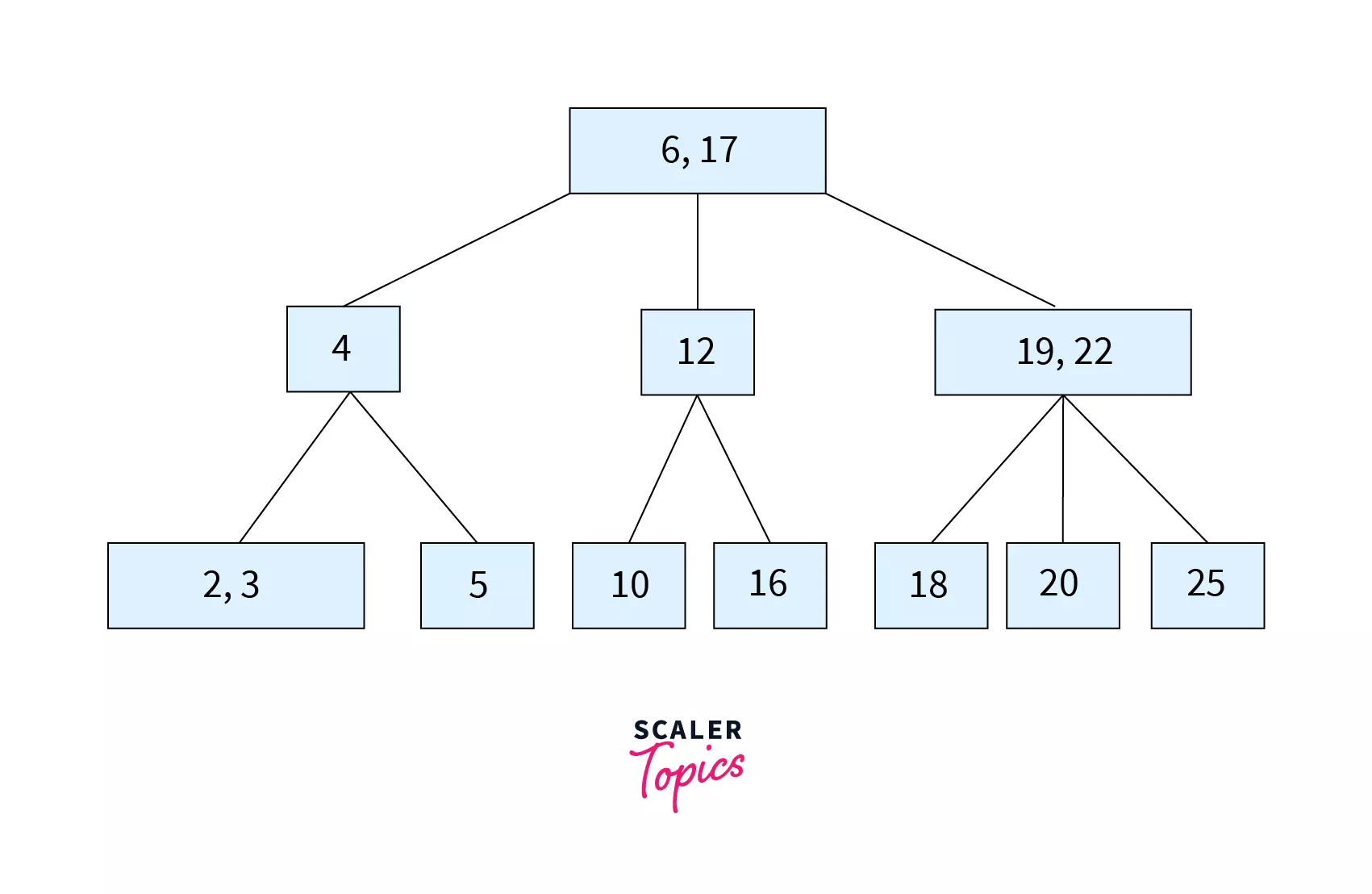
B-Tree: A tree where every node (root, middle, leaf) stores Keys + Data pointers.
-
B+ Tree: A tree where only the leaf nodes store Keys + Data pointers. Internal nodes store only Keys (just for navigation).
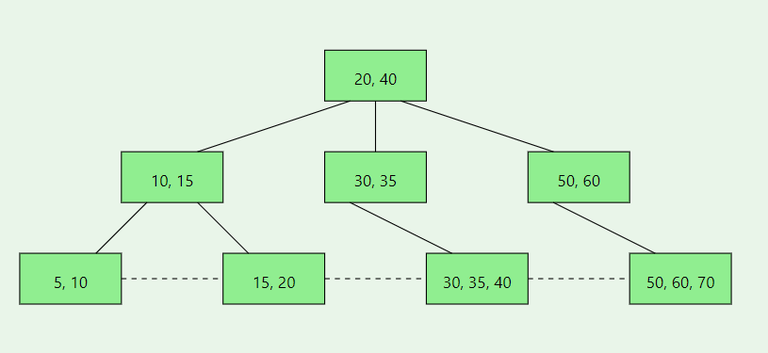
Q1. Where is the data stored?
- B-Tree: In all nodes.
- B+ Tree: Only in leaf nodes.
Q2. Which is faster for searching?
- B+ Tree. Because internal nodes have no data, they can hold more keys → tree becomes shorter → fewer disk reads.
Q3. Which is better for range queries (e.g., BETWEEN 10 AND 20)?
- B+ Tree. Because leaf nodes are linked together. Just find the start and walk forward.
Q4. Why do databases use B+ Trees instead of B-Trees?
- Faster searches (shorter tree).
- Efficient range queries (linked leaves).
- Predictable performance (every search takes the same time).